Migrating a coaching membership from Kajabi to WordPress means moving your course content, your member list, your active subscriptions, and your payment processing from Kajabi’s closed platform onto a self-hosted WordPress stack, typically built on MemberPress, LearnDash, or WooCommerce Subscriptions, without disrupting the members who are already paying you.
That last part is what makes this different from a normal website migration. You’re not just moving pages, you’re moving recurring revenue that has to keep collecting on schedule while the underlying system changes underneath it. This guide walks through why coaches make this move, what to prepare before you start, the actual step by step process, and where these migrations most commonly go wrong.
Why coaches migrate from Kajabi to WordPress
Kajabi is a genuinely capable all in one platform, and for a coach just starting out, that bundling is the appeal. The reasons to leave usually show up later, once the business has grown past what the bundle was designed for.
Rising or unpredictable platform costs: Kajabi has restructured its pricing more than once in recent years, and businesses on a growth plan can find the cost of staying on the platform climbing faster than they budgeted for, especially once transaction related fees are factored in.
Platform dependency: Your content, your member data, and your checkout flow all live inside one vendor’s system. If that vendor changes a policy, a fee structure, or a feature set, you have limited recourse.
Ceiling on customization: Kajabi is built to be easy, which means it is also built to be uniform. Coaches running a more sophisticated tiered offer, custom drip logic, or a unique member experience often hit the edges of what the platform allows.
Wanting full ownership: A self-hosted WordPress site means your content, your database, and your member relationships sit on infrastructure you control, not infrastructure you rent.
What you need before you start
A membership migration goes wrong far more often from missing preparation than from a technical mistake mid process. Confirm each of these before touching anything.
- WordPress hosting sized for membership and video traffic, not a basic shared plan
- A domain you control, ideally already pointed away from Kajabi’s own infrastructure
- Your chosen WordPress membership stack decided in advance (see the plugin comparison in the FAQ below)
- A full export from Kajabi of your content, your member list with email addresses, and your active subscription and offer data
- A plan for reconnecting your payment processor without cancelling active subscriptions
- A maintenance window communicated to members in advance, even if the switch itself is designed to be invisible to them
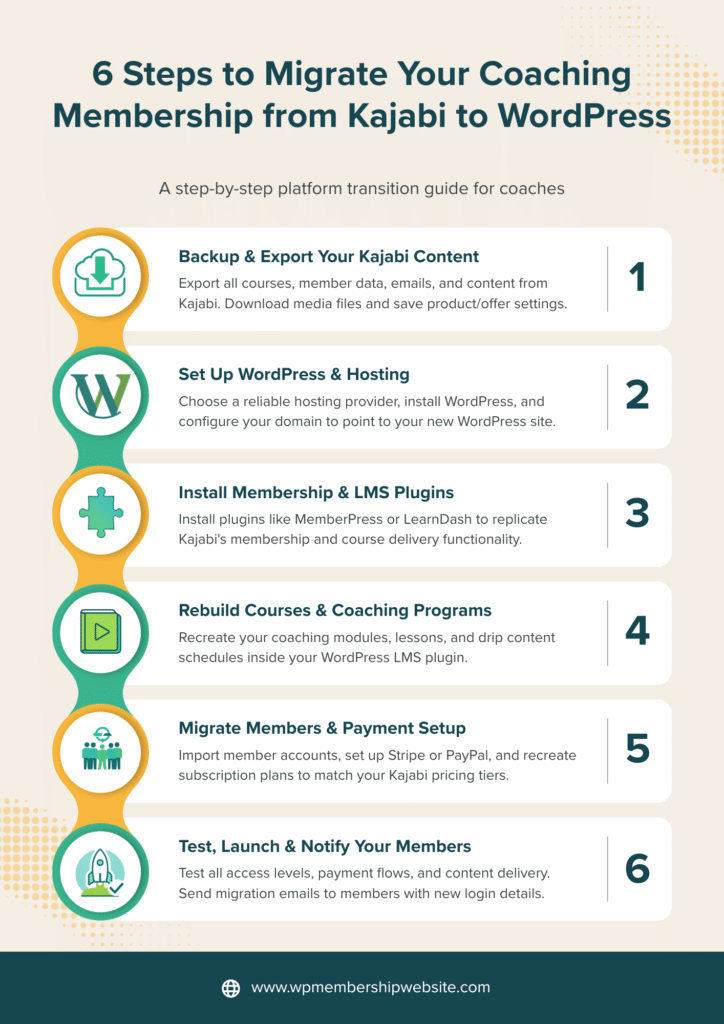
The migration process, step by step
This is a real sequence, and skipping ahead is where most of the risk comes from. Each step assumes the one before it is fully complete.
01. Audit and export everything from Kajabi
Pull a complete export of your content library, your full member list including email addresses and current subscription status, and your offer and pricing structure. This becomes your source of truth for every step that follows.
02. Choose and set up your WordPress membership stack
Decide on your membership and course plugin combination based on your actual offer structure, not the most popular option in general. A pure membership model and a course heavy model call for different tools.
03. Stand up WordPress on production-grade hosting
Install WordPress, your membership plugin, your course delivery plugin if separate, and your security and backup layer on hosting that can handle both member traffic and video or file delivery without slowing down.
04. Rebuild your content structure and re-upload media
Recreate your modules, lessons, and drip schedule inside the new system, and move video and downloadable assets to hosting or a delivery service suited for self hosted media, since Kajabi hosts video internally in a way WordPress does not replicate by default.
05. Reconnect your payment processor and recreate subscription plans
This is the highest risk step in the entire migration. The goal is to carry active subscriptions across so renewals continue on their existing schedule, rather than cancelling members in Kajabi and forcing them to sign up fresh, which resets billing dates and often causes real churn.
06. Import members and grant correct access by tier
Bring your member list into the new system and map each member to the correct membership tier, without forcing an unnecessary mass password reset that creates friction and support tickets on day one.
07. Run a full parallel test before cutover
Test a real purchase, a real login, a plan upgrade, and a cancellation flow on the new WordPress site while Kajabi is still live, so any issue surfaces before a single real member is affected.
08. Point DNS to WordPress and set up redirects
Switch your domain over and put 301 redirects in place from every indexed Kajabi URL to its WordPress equivalent, so search rankings and any bookmarked member links carry across instead of breaking.
09. Monitor the first billing cycle closely
Watch renewals and failed payments closely through the first full billing cycle on the new system, since this is when a payment reconnection issue, if one exists, will surface.
10. Decommission Kajabi only after a clean billing cycle
Keep the Kajabi account active but not the source of truth until you’ve confirmed one full billing cycle has processed cleanly on WordPress, then close it out.
Where migrations usually go wrong
Billing continuity
Cancelling a Kajabi subscription and creating a fresh one on WordPress instead of carrying it across resets the renewal date and often triggers a duplicate charge or a confused member who cancels out of caution.
Media delivery
Kajabi hosts video internally. Moving that content to WordPress without a proper video hosting or delivery plan leads to broken lessons or a site that slows to a crawl under real traffic.
Lost search visibility
Any blog or content page that Kajabi had indexed in Google needs a matching redirect on the new site. Skipping this step is the single most common cause of a real SEO drop after migration.
Underestimating hosting needs
A membership site with active video delivery and concurrent logins needs more than entry-level shared hosting. Undersized hosting is a frequent cause of post-migration performance complaints.
Realistic timeline and cost
Exact numbers depend on your content volume and how many active members and tiers you’re carrying across, but this is the general shape most migrations fall into.
| Membership size | Typical timeline | What drives the cost |
|---|---|---|
| Small (1 tier, under 100 members) | 1 to 2 weeks | Plugin setup, content rebuild, single payment reconnection |
| Medium (2 to 3 tiers, 100 to 1,000 members) | 3 to 4 weeks | Multiple tier mapping, larger content library, parallel testing depth |
| Large (Multiple tiers, 1,000+ members) | 5 to 6 weeks | Complex automation rules, high stakes billing continuity, staged rollout |
Because scope varies so much between businesses, most migrations of this kind are quoted per project after a short audit rather than priced from a flat-rate card.
Frequently asked questions
How long does a Kajabi to WordPress migration take?
A straightforward migration with one or two membership tiers and a moderate content library typically takes two to four weeks. Larger catalogs with extensive video libraries, multiple tiers, or complex automation rules usually take four to eight weeks to migrate and test properly before cutover.
Will my active Kajabi subscribers keep being billed during the migration?
They can, if the migration is planned correctly. The safest approach reconnects your existing payment processor to the new WordPress site and carries active subscriptions across without cancelling and re-billing members, so renewals continue on schedule instead of resetting.
Do I need a developer to migrate from Kajabi to WordPress?
Technically no, since WordPress migration tools exist, but a membership migration carries real risk around active billing, member access, and content structure. Most coaches hire a developer specifically for the payment reconnection and member import steps, even if they handle simpler tasks themselves.
What WordPress plugin replaces Kajabi’s membership features?
MemberPress or WooCommerce Subscriptions typically replace Kajabi’s membership and billing layer, while LearnDash replaces its course delivery features. Many coaching businesses combine one membership plugin with one course plugin, since Kajabi bundles both into a single closed system.
Will I lose my Kajabi SEO rankings after migrating?
Not if 301 redirects are set up correctly from every indexed Kajabi URL to its new WordPress equivalent before the old site goes offline. Rankings usually dip briefly during the transition and recover within a few weeks when redirects and metadata are handled properly.
Can I keep using Kajabi’s email marketing after migrating my membership?
Yes, this is a common hybrid setup. Some coaches keep Kajabi or another tool purely for email marketing while moving membership access, course delivery, and billing to WordPress, since the two systems can run independently and connect through integrations.
Is WordPress cheaper than Kajabi long term?
For most established coaching businesses, yes, since WordPress hosting and plugin licenses generally cost less per month than Kajabi’s higher tiers once a business outgrows the entry plan. The tradeoff is an upfront migration and setup cost, which is why most businesses migrate once, not repeatedly.